
Self-service checkout is a growth lever nearly every B2B company eventually reaches for. Faster sales cycles, lower acquisition costs, the ability to scale without hiring more reps. The business case practically writes itself.
What doesn't write itself is the answer to a question most companies don't ask until it's too late: what happens to tax compliance when you remove humans from the sales process?
Here's the thing. Your sales reps weren't just closing deals. They were quietly doing compliance work in the background: checking whether a customer is a registered business, validating tax IDs, determining whether VAT applies. Take them out of the loop, and you need systems that can make the same calls. Automatically. In real time. At scale.
One global corporate wellness company learned this the hard way when they discovered that 15% of customer-submitted tax IDs were invalid. Without automated validation, every one of those self-serve transactions would have created problems downstream: invoices customers couldn't use for VAT reclaim, or sales incorrectly zero-rated that left the company holding the liability.
Tax ID validation isn't about data quality. It's about VAT determination.
Let's back up and talk about why this matters. Tax ID validation sounds like a data hygiene problem. It's not. It's the mechanism that determines whether you charge VAT on a transaction.
When a validated B2B customer checks out (meaning you've confirmed their tax ID is active in a government database), you typically don't charge VAT. The reverse charge mechanism kicks in, shifting VAT liability to the buyer. They account for it in their own jurisdiction. Everyone's happy.
When a customer can't provide a valid tax ID, or they're a consumer, you must charge VAT. No valid tax ID means no proof of VAT registration, which means no reverse charge. Simple as that.
Get it wrong in either direction and you've got a problem. Add VAT to a B2B customer who shouldn't have paid it, and they may not pay the invoice until it’s corrected. Cue the support ticket and delayed cashflow. Fail to charge VAT when you should have, and you're still liable for that tax. It just shows up later, during an audit, with penalties attached.
What a tax-friendly checkout flow actually looks like
So what does this look like in practice? The flow below shows how a well-designed self-service checkout handles tax ID validation, from the first question (business or consumer?) through to a high-confidence outcome.
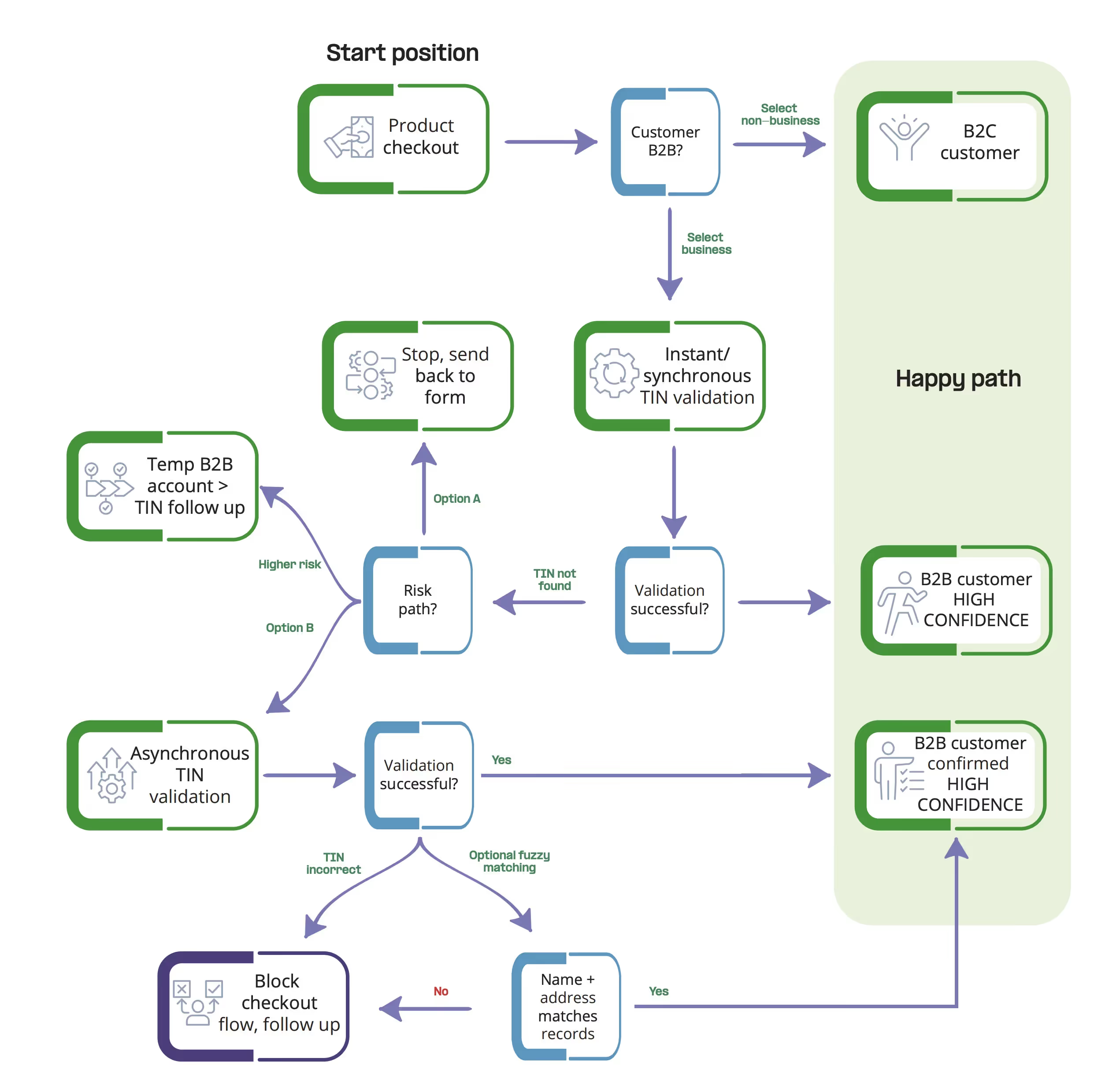
Notice the branching logic. For B2C customers, the path is simple: charge VAT and proceed. For B2B, instant validation determines whether you can confidently apply reverse charge treatment. When validation fails, you need decision points: do you stop the checkout and ask for corrections, or create a temporary account and resolve it asynchronously?
The "happy path" (shown in green) is where you want most transactions to land: validated B2B customer, high confidence, clean data flowing into your invoicing system.
Here's how to build this into your own checkout:
Start with the obvious question. Is this buyer a business or a consumer? For consumers, charge VAT and move on. For businesses, you need to validate.
Validate tax IDs in real time. When a customer enters their tax ID, check it against government sources instantly. If it validates, you've got a high-confidence B2B customer and can apply the appropriate tax treatment.
Decide how to handle failures. When a tax ID doesn't validate, you have options. The conservative path: stop checkout and ask the customer to fix it. Clean data, but friction. The flexible path: create a temporary account and validate asynchronously, following up before you invoice. Better conversion, but you need solid processes behind it.
Use fuzzy matching as a safety net. Sometimes the tax ID has a typo but the business is real. Matching name and address against government records can recover transactions that would otherwise fail.
The principle that ties it all together: every B2B transaction should end with either a validated tax ID or a clear escalation path. What you cannot afford is ambiguity that only surfaces when you try to issue an invoice.
The corporate wellness company mentioned earlier implemented this approach with Fonoa Validate and saw a 33% reduction in tax ID-related support tickets.
5 tips to get your implementation right
1. Prioritize speed above all else
Validation needs to return results in milliseconds, not seconds. Customers won't wait for a loading spinner while you ping a government database. If your API adds noticeable latency to checkout, your conversion rate will suffer.
2. Go global from the start
Tax ID validation has a habit of becoming a gating factor for new markets. If your solution only covers a handful of countries, you'll either limit growth or bolt on workarounds every time you expand. Look for a single API that validates against 100+ government sources.
3. Cover every entry point
Self-service checkout is rarely the only way customers enter your system. Deals closed in Salesforce, customers who start online but finish with sales, partner integrations. If validation only happens in one channel, you've solved half the problem.
4. Build an audit trail automatically
Every validation should generate a timestamped record with the full response from government sources. This is your proof that you determined VAT treatment correctly. When an auditor asks why you didn't charge VAT on a transaction, you want a one-click answer.
5. Plan for edge cases before launch
The happy path is easy. What happens when the government database times out? When the customer insists their ID is correct but it keeps failing? Or when you need to find a tax ID based on a company name? Build these exception paths before you go live, not after support tickets start rolling in.
The bottom line
Self-service checkout unlocks real growth. But the companies that make it work don't just invest in slick UX. They build the tax infrastructure that keeps the whole thing compliant at scale.
Curious how real-time tax ID validation could fit into your checkout flow? Explore Fonoa Validate or talk to our team about your setup.






.jpg)